Catalog part editor
Use the Corporate Catalog Edit tool to edit the properties of a catalog part.
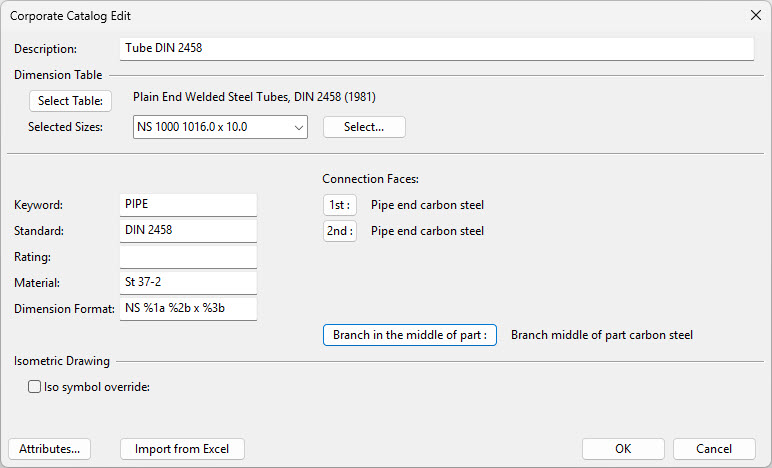
The editor contains the following:
|
Button/field |
Description |
Value stored in tag |
|---|---|---|
|
Description |
General description, which can be used in listings. You can give description in other languages as attributes for the catalog part. |
DE |
|
Dimension Table |
Select the dimension table. |
|
|
Selected Sizes |
Select the sizes from the dimension table. You see the sizes according to the dimension format. |
|
|
The keyword is used in e.g. to searching matching parts in the catalog. |
KW |
|
|
The standard to which the part belongs. |
ST |
|
|
The rating of components. The number included in the text of this field must be greater than or equal to the number in the Rating of the piping specification. If this field is empty, the rating is ignored. |
RT |
|
|
Material of the part. This string is used as a key when searching the density factor. Weight of components (from the associated dimension table) are multiplied by this factor when they are used. |
MC |
|
|
The content and appearance of dimensional information for components. You can select one existing dimension format from metric or imperial system, or you can write the format. The precision of the dimension format should correspond with the precision in the Dimension Table (Conv code). |
DF |
|
|
Define connection faces for the node points. Node points are according to the geometry type (number, location). This information is used to check the compatibility of components to be connected, and to determine gaskets for clamp connections, and gaskets and bolt sets for flanged connections. |
CO |
|
|
This button is visible for catalog parts into which branches can be created, and allows choosing a subtype for the connection face. As a result, branch anchor nodes created for pipes, elbows, concentric reducers, or eccentric reducers that use internal shapes and this catalog part will use the specified connection face type. The default choice is Subtype 0 – Branch middle of part. Exceptionally, a branch anchor node with Subtype 0 is fully compatible with branch parts of all subtypes of the connection faces Auxiliary point, Butt joint, Branch point, and Plain pipe end without requiring a compatibility definition. |
|
|
|
You can select the isometric symbol for the catalog part. The symbol is normally selected in the Dimension Table. |
|
|
|
Attributes |
Select attributes for the catalog part. You can assign attributes also for Part Sizes. Size-related attributes override part-related attributes with the same name. |
|
|
Import the catalog part's properties from a Microsoft Excel file. See Creating catalog parts by import from Excel. |
|
To select the keyword, standard, rating, material, and dimension format, right-click the corresponding field, and choose from the list.
For each component in the part family, the corporate catalog stores a line index that points to the associated dimension table. When dimensions are requested, this index determines the appropriate dimension vector from the dimension table. For this reason, it is important that the order of dimensions in the dimension table remains unchanged.